
Programming in Any Language
Password Keeper (with security)


Click to enlarge
Password Keeper is an application that keeps passwords for you. Basically, via an add function, the program allows you to enter a company or web site name along with your login ID and password. It then stores that information on disk. It also has a search mechanism that lets you locate the web site or company you’re interested in and returns your login ID and password. The delete function lets to totally remove a record. The Edit function lets you make changes to the company name, login ID and password. And you could easily add other fields to this application if you are interested.
To make this simple there is no security on this application. We can implement that after we’ve covered it. For now, this is just a useful application that will let you gain experience with panels, arrays, list boxes, binary search, sorting and more. We’ll cover all that in a series of steps, the first one being Analysis.
Form Design comes next. The more work you did in analysis, the more complete your form is going to look. This does not have to be perfect. As you code you can make all the form changes you like. A good form design, however, will minimize the number of changes you will have to make. (PDF: Design of the form and 4 panels)
Programming, needs to be done logically. Think of your buttons - the Add, Search, Exit, and the others - as separate programs. In a sense they are. Each button is charged with doing a specific task. The first things we’ll code are Form_Load and Exit button.
When this application is first used there is no text file. Later there will be. Form_Load next to be aware of this and handle it. And so does the exit button. This application uses a tab delimited text file. Every time the program is used there could be a change to the data. The array will need to be saved every time the program is exited.
The Add button takes data from the text boxes and stores the data in the array. But the user can cancel the Add function if desired.
Edit, Delete and just a simple Search all rely on the records being in sequence. And Search will used to find the record that needs to be deleted or edited. It makes sense to make sort a part of the Search operation.
We originally thought we would need to search in order to find the record we needed to delete. In effect all we needed to do was save the pointer in the normal search function and make it available to both delete and edit. Delete is actually pretty easy.
When we go into Edit, we simply populate the text boxes on the form with three pieces of data from the three arrays. Just like delete, where we place the last record into the open spot in the array, edit replaces the new data into the same array location. No problem if the data is not in alphabetical order, the next time Search is used the data is automatically sorted to its proper order.
It doesn’t take too much to pretty-up an application and make it attractive to the user. Usually, a nice graphic or a touch of color does the trick nicely. You don’t want to go overboard on this, but you do want the application to sort of standout pleasantly.
As a part of Cosmetics, we are going to add one more panel to the form. This panel will do nothing more than hold a graphic of a small safe. Since this application holds password information a safe makes a nice cover for our application. And that’s how it will function. When the program is not in use the graphic will be the focal point. While the application is in use the graphic will disappear and not get in the way.
Up to now the passwords are saved in plain text. By adding a static class that performs encryption on a password we can secure this application with very little change to the code itself. Before exiting the program, we simply pass each password to the encryption class. It passes back the encrypted password, and it gets saved to the text file. When we start the program, form_load reads the text file. It, too, passes the encrypted password to the encryption class so the password can be decrypted in the application.
PDFs: Slides, Encrypt Class, Form Code
The Anything Database, Version 4
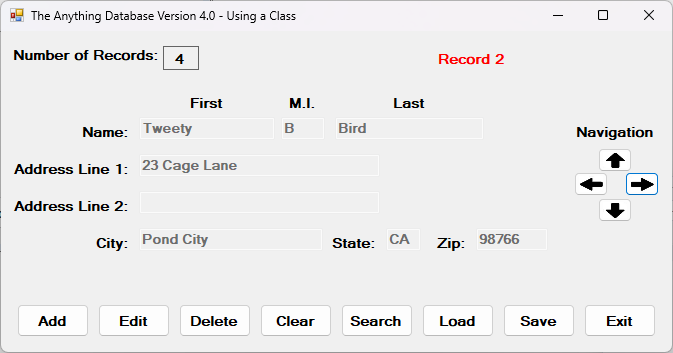
In this series of videos I’m taking the Anything Database constructed in the Structures section and changing it to use a Class instead of a structure. There will be some parts to this series of videos that will be identical to the Structure series. But most of the parts will be different. The biggest difference will be in the amount of coding needed for the application itself. Because all code manipulating the data is contained in a class, all the actual application has to do is do the functions of a database type program.
Once again, we will be storing the data in a text file, but it will be formatted to be easily ported into a database or a spreadsheet.
This application will be broken down into nine parts. They are: 1. Analysis and design; 2. Adding Records; 3. Navigation; 4. Saving records; 5.Loading records; 6. Editing records; 7. Deleting records; 8. Clear the file; and 9. Searching records.
Class Code PDF: Person Class
Code Progression PDFs: 1) Analysis and Design; 2) Adding a Record; 3) Navigation; 4) Saving Records; 5) Loading Records; 6) Editing Records; 7) Deleting Records; 8) Clear the File; 9) Searching